
If you run a station, a channel or a hosting platform, you spend part of every day inside your control panel. Checking what is playing, pulling listener numbers, tidying a playlist, answering a customer who wants to know why their stream dropped at 2am. MediaCP 2.16 introduced an MCP Server to the on-premise panel, which means an AI assistant can now do that work alongside you. This post explains what an MCP server actually is, in plain terms, and what changes about your day when you have one.
The short version
MCP stands for Model Context Protocol. It is an open standard for connecting AI assistants to the software you already use. An MCP server is the piece that sits with the software and gives an assistant a safe, defined way in.
MediaCP describes its own implementation like this, in the panel itself:
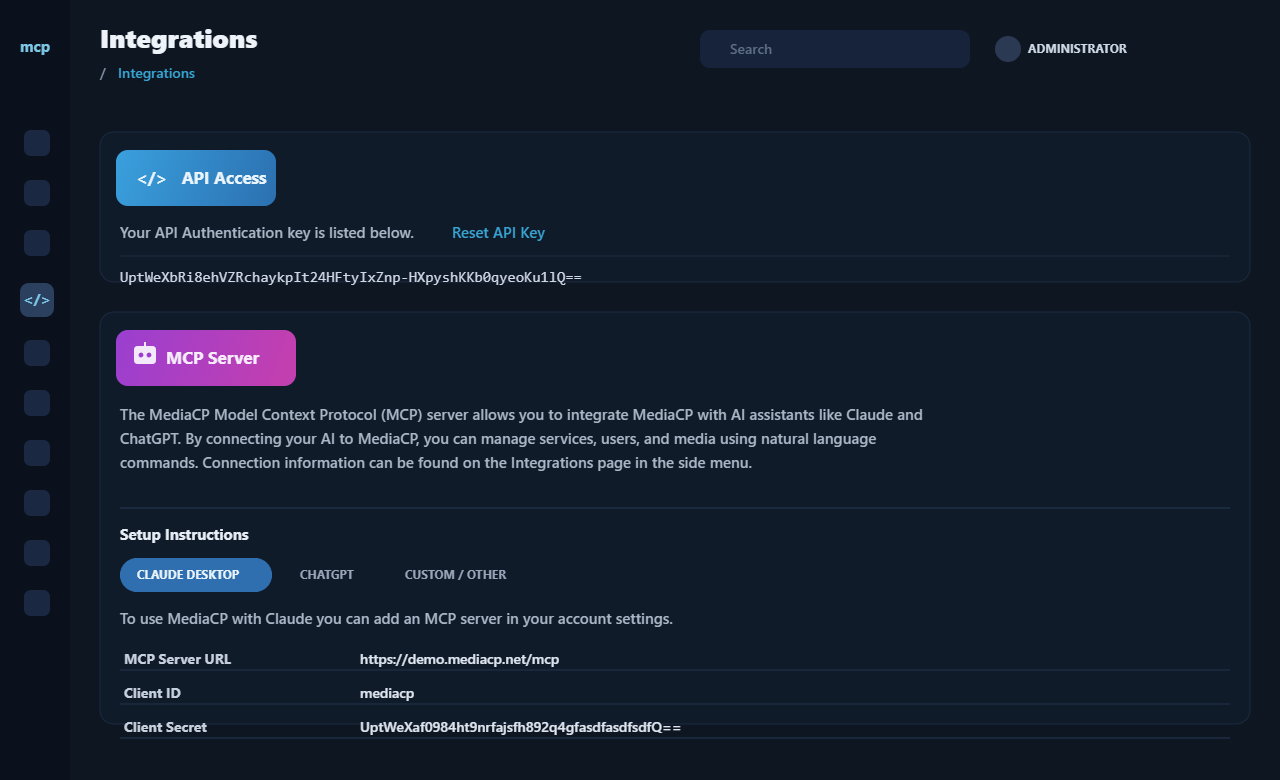
The MediaCP Model Context Protocol (MCP) server allows you to integrate MediaCP with AI assistants like Claude and ChatGPT. By connecting your AI to MediaCP, you can manage services, users, and media using natural language commands.
MediaCP Integrations page, System Config
Once it is switched on and your assistant is connected, you ask for something in everyday language and the assistant carries it out inside the panel.
You are no longer being told which menu to click. The work is simply done, and you review it.
Why does AI need an MCP Server?
An AI assistant without an MCP server is a knowledgeable contractor standing outside a locked building. It can tell you, in general terms, how a streaming panel usually works. It cannot see your stations, your listener figures or your schedule, and it cannot change anything.
The MCP server is the door, with a proper key and a clear list of what the contractor is allowed to touch. It tells the assistant exactly which things it can look at and which actions it can take, works out the shortest route to an answer, and hands the result back.
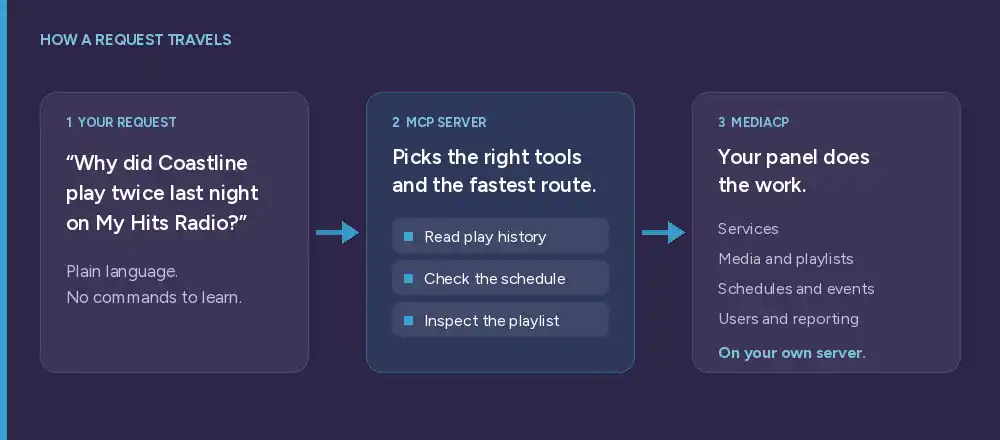
One question, several tools, one answer
The real power is not any single tool. It is the assistant chaining several of them together in one go, the way you would if you had the time.
Ask why a track repeated and the assistant reads the play history, checks the schedule and inspects the playlist, then tells you which one caused it. Ask for a playlist and it looks at listening figures first, then builds from what your audience actually stayed for. Each step is small. Strung together, they answer questions that used to take three screens and a spreadsheet. These are ordinary sentences, not commands to memorise:
- “When do listeners spend the most time on My Hits Radio? Compare this month with last.”
- “Find the most popular tracks on My Hits Radio this month and propose a playlist.”
- “Show me what is playing now, the current listener count, and whether anything looks wrong.”
- “Read the last 20 tracks played by service 105 and look for repeats.”
- “Draft a maintenance announcement for tomorrow at 10:00 AM.”
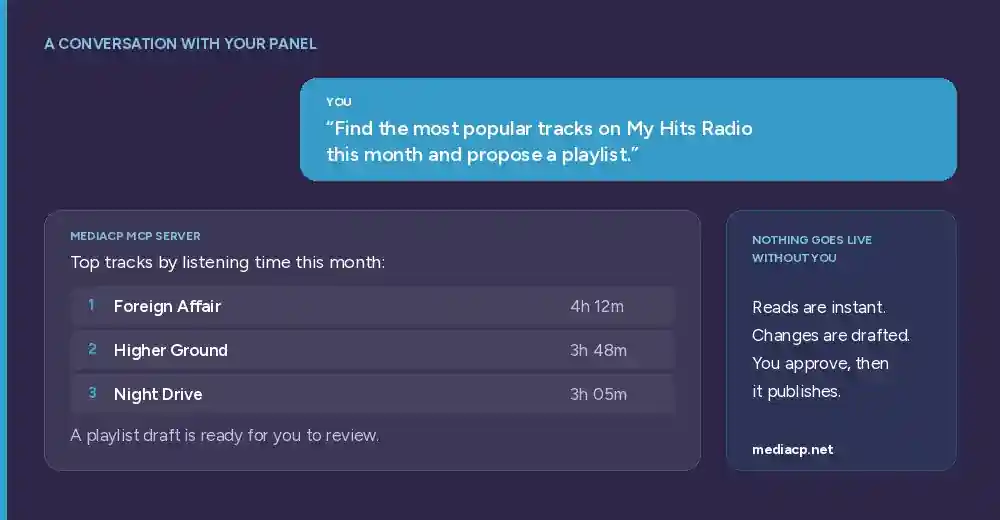
What can MCP Server integration achieve?
Our goal is simple: anything you can achieve through the MediaCP interface or the API should be available through the MCP Server as well. Not a cut-down subset, not a handful of read-only lookups, but the same platform you already run, reachable in conversation. That is the standard we are building towards, and each release moves more of the panel across.
Today that already covers:
- Audience insights. Listeners and viewers, sessions and reporting, so you can answer a question about performance without building a report first.
- Media and playlists. Organise your library, build and update playlists, and get the tedious sorting done by describing what you want.
- Scheduling and events. Manage schedules, stream events and announcements, drafted for you and ready to check.
- Live monitoring. Services, stream targets and system statistics, so you can see the state of the platform in one answer.
- DJs and users. Review accounts and access, and handle the routine changes that arrive in ones and twos all week.
- Everyday admin. The general running of the platform, handled through conversation instead of a tour of the menus.
You stay in control
When our team sat down to design this, the first decision was where it should live. The easy route would have been a hosted service: we run the MCP Server, your panel talks out to us, and everything passes through infrastructure you do not own. We did not want to build that, and we did not think you would want to run it.
So the MCP Server ships inside MediaCP. It runs on your own installation, on your own hardware, behind your own firewall. Your stations, your listener data and your customer records never leave the system you already trust with them. You generate the key from your own Integrations page, you decide which assistant gets it, and you can revoke it whenever you like. The assistant is held to exactly the same access rules as the account behind that key.
Consequential actions are always shown to you before anything is created or published.
Nothing is quietly pushed live on your behalf. Reads happen instantly, changes come back as drafts, and you approve them.
Value for both broadcasters and administrators
For a broadcaster, it removes the detective work. A listener emails to say Coastline played twice on Tuesday night. Normally that means opening the play history, cross checking the schedule, then working through the playlist to see whether the track sits in two rotations. Ask the assistant instead and it does all three, then tells you the track appears in both the evening and overnight playlists and offers to remove the duplicate. What was twenty minutes of clicking becomes one question.
For an administrator supporting end users, it shortens every ticket. A customer reports their stream keeps dropping. Rather than asking them for screenshots and account details, you ask the assistant to pull up that service, its recent statistics, its stream targets and its current status, all in one reply. You can check a user’s configuration while you are still reading their message, spot the misconfigured bitrate, and answer with the fix rather than a request for more information.
You keep the judgement. The repetition and the searching go somewhere else.
It also widens who can help. Someone newer on your team can safely handle work that used to wait for whoever knew the panel best, because the assistant does the looking up and the panel still enforces the same permissions.
The MCP Server is available on MediaCP 2.16 or newer with an active Unlimited subscription or Perpetual license. Start small. Pick the question you look up most often, or the report you rebuild by hand every month, and hand that over first.
