A streaming control panel brings the technical, operational and administrative parts of broadcasting into one interface. It can help a radio station schedule AutoDJ content, allow a video team to manage live and on demand channels, or give a hosting provider one place to serve many customers.
The panel is not the broadcast itself. It coordinates the tools and infrastructure that produce, carry and deliver it.
Where does a control panel fit?
A typical broadcast travels through five stages, from the microphone or camera in the room to the player in someone’s hand. The control panel does not replace any of those stages. It sits above them.
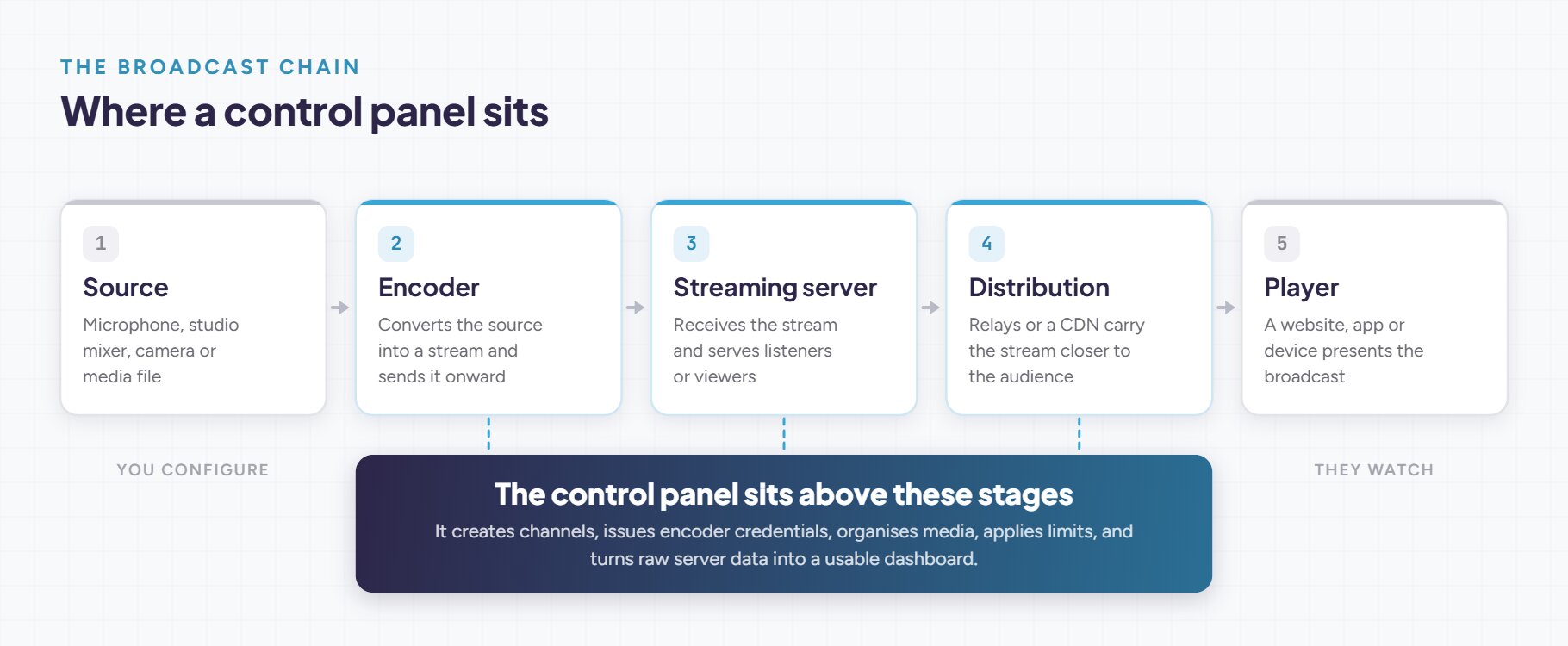
The control panel creates channels, configures services, issues encoder credentials, organises media, applies limits and turns server data into a usable dashboard.
This distinction matters. Icecast, for example, is an audio streaming server. Its own administration interface can expose statistics, update metadata and move listeners between mount points. A full control panel normally builds on those server functions and adds scheduling, users, automation, reporting and multi service administration.
Encoder
Streaming server
Control panel
CDN or relay
What does a streaming control panel manage?
Features vary between products, but a capable panel usually covers most of the following.
Channel management
Encoder access
Media and automation
Reliability
Audience delivery
Monitoring
Access control
Provider tools
You will lean on different parts of this depending on what you broadcast. A radio station may care most about AutoDJ, live DJ priorities, metadata and royalty reports. A video service may prioritise transcoding, adaptive bitrate, recording, simulcasting, VOD and CDN delivery.
What does it look like in practice?
The same panel is used very differently depending on what is being broadcast. Pick the closest match below.
Typical workflow. Live DJs connect over Icecast or SHOUTcast when they are on air. AutoDJ covers everything else from a scheduled playlist, and metadata updates carry the now playing track to players and directories.
What it needs. AutoDJ and playlist scheduling, live source priority and fallback, mount points and per DJ credentials, listener statistics and royalty reporting, plus an embeddable player and public page.
Typical workflow. A production switcher such as OBS or vMix sends a contribution feed over RTMP, RTMPS or SRT. The server transcodes it into several qualities and delivers adaptive playback to a website or app.
What it needs. RTMP, RTMPS and SRT ingest, transcoding and adaptive bitrate, recording, simulcasting to social platforms, embeddable players and CDN or relay delivery.
Typical workflow. A scheduled channel runs continuously from a media library, with live content taking over when it is available and the schedule resuming afterwards.
What it needs. Media storage and playlist scheduling, reliable failover to fallback content, recording and catch up, monitoring and alerts, and enough automation that nobody has to be watching at three in the morning.
Typical workflow. One operator runs many customer services across one or more servers. Customers self serve inside their own account and never touch the operating system.
What it needs. Multi tenant accounts and reseller roles, listener, bitrate, transfer and storage limits, provisioning and billing integration through an API or WHMCS style module, and per customer reporting.
A control panel is not an encoder
The encoder prepares the audio or video contribution stream. The control panel tells the broadcaster where and how to connect, then manages what happens around that connection. The two are bought, chosen and replaced independently.
Common radio encoders
- BUTT and Rocket Broadcaster for straightforward microphone or mixer input.
- Mixxx and SAM Broadcaster when DJ mixing and library tools are needed.
- Liquidsoap and FFmpeg for automated or customised workflows.
Common video encoders
- OBS Studio for free, general purpose production and streaming.
- vMix and Wirecast for switching, graphics, guests and professional production.
- FFmpeg for automated encoding, relay and transcoding.
- Larix Broadcaster for mobile contribution.
- Teradek, Magewell, AJA and Blackmagic hardware for dedicated HDMI or SDI encoding.
How does it improve daily work?
Configuration by hand
- Edit configuration files and restart services
- Create operating system users for each broadcaster
- Read logs to work out what went wrong
- Bolt on separate tools for scheduling and reporting
- Repeat all of it for the next channel
One managed workflow
- Create a channel and upload content in a browser
- Issue encoder credentials without shell access
- Schedule programming and set fallback content
- Read status, listeners and bandwidth in one dashboard
- Repeat the setup consistently, or delegate it
Even at a single channel, the panel removes the parts of the job nobody enjoys: shell access, configuration files and log reading. The gap only widens with every channel you add, and the first time somebody other than you needs to go live.
The benefit is not simply convenience. A consistent interface reduces repetitive setup and makes responsibilities clearer. The panel should still expose enough status and documentation for technical staff to diagnose the underlying service.
Self hosted or managed?
There are three broad ways to get a broadcast out, and the right one depends less on budget than on how much infrastructure you actually want to own.
Direct to platform
Managed platform
Self hosted panel
Neither model is universally better. Managed platforms reduce operational work. Self hosting offers more control over infrastructure, branding and customer workflows, but requires capable administration.
MediaCP covers both. Cloud Video is a managed video platform, while the Audio panel and Video panel are installed on infrastructure you control. Other vendors divide these responsibilities differently, so it is worth checking which model a product actually assumes.
When is a control panel useful?
A control panel becomes valuable when several of these are true. Tick the ones that describe your situation.
If you ticked even one, a panel is already saving you time and preventing problems. Pick one that supports the workflow you run today and the growth you expect, so you are not migrating the moment the station gets busier.
What to check before choosing a panel
- Servers and protocols. Does it support what you actually broadcast: Icecast, SHOUTcast, RTMP, RTMPS, SRT, HLS? Check it against your encoders before anything else.
- Transcoding and quality. Can it produce several bitrates from one source, so mobile listeners and viewers are not stuck with your studio bitrate?
- What happens when the source drops. Fallback content, AutoDJ takeover, automatic failover and alerting are the difference between a blip and dead air.
- Recording, analytics and data ownership. Is your output recorded and retained automatically, and do the listener and viewer figures belong to you or to somebody else’s platform?
- Automation and integration. Is there a REST API, and a billing integration such as WHMCS if you are reselling? Anything you do more than twice should be scriptable.
- Branding. Can the panel, player, public pages and domain carry your brand rather than the vendor’s?
- Licensing, support and exit. How is it licensed, per server, per stream or flat? Who handles updates, backups and security, and what migration tooling exists if you ever move?
A good streaming control panel does not replace sound broadcast engineering. It makes that engineering easier to operate, repeat and understand.
One panel for radio, video and everything scheduled in between
Frequently asked questions
The streaming server, such as Icecast, SHOUTcast or an RTMP and HLS server, is the service that receives your stream and delivers it to listeners or viewers. The control panel sits above it. It creates and configures those services, issues encoder credentials, organises and schedules media, applies limits, and turns the server’s raw data into a usable dashboard. Most servers ship with a small admin interface of their own, but that manages one service rather than a whole platform.
Even one channel gains a lot. Running it through a panel rather than straight into a single platform gives you listener and viewer analytics that belong to you, automatic recording of everything you put out, scheduled and automated programming so the channel keeps running when you are away from the desk, and fallback content if your source drops. You also get your own embeddable player and public page, and the option to add a second destination later without rebuilding anything. Streaming to one platform is a starting point rather than a ceiling.
No. The encoder, whether that is OBS Studio, BUTT, vMix, Liquidsoap or a hardware unit, prepares the contribution stream and pushes it out. The control panel tells the broadcaster which server address, port, mount point or stream key to connect to, then manages everything around that connection. The two are chosen, paid for and replaced independently.
Yes, though not every product does. Panels differ in whether they support audio servers such as Icecast and SHOUTcast, video ingest over RTMP, RTMPS or SRT, or both. MediaCP covers audio and video, so a station running an AutoDJ schedule and a video channel with adaptive bitrate can be administered from the same place. Check protocol, codec and metadata support against what you actually broadcast before committing.
With a self hosted panel you install the software on servers you control. That gives you ownership of infrastructure, branding and customer workflows, and makes you responsible for capacity, security, updates and backups. A managed platform means the provider runs the infrastructure and distribution for you, with less operational work but less control. The right choice depends on how much infrastructure you want to own, not on budget alone.
Multi tenant accounts with reseller and customer roles, enforceable listener, bitrate, transfer and storage limits, provisioning through an API or a billing module such as WHMCS, and per customer reporting. Just as important is the ability to delegate access without handing out operating system logins. Fallback content, recording and monitoring matter more for a provider than for a single broadcaster, because you are answering for someone else’s uptime.
