MediaCP Manual
    1. Getting Started
    2. Sales Questions
    3. Frequently Asked Questions
    4. Transcoder System Benchmarks
    5. Start your own streaming platform
    1. Change account currency
    2. Product Licensing
    1. Introduction
    2. Installation & Upgrade
      1. System Requirements
      2. Versions & Releases
      3. Installation
      4. Upgrading
      5. SSL Certificates
      6. Streaming Servers
        1. MediaCP Video
        2. Wowza Streaming Engine
        3. Flussonic Media Server
        4. Video Feature Comparison
        5. Icecast 2 / Icecast KH
        6. Shoutcast 2
    3. Billing Integration
      1. Blesta Integration Guide
      2. WiseCP Integration Guide
      3. WHMCS Integration Guide
      4. Clientexec Integration Guide
      5. Billing Platform Comparison
    4. Migrate from other software
      1. Migrate From Centovacast
      2. Migrate From AzuraCast
    5. Backup & Restoration
      1. Restore MediaCP
      2. Backup MediaCP
      3. Transfer to another server
    6. Administration
      1. MediaCP System Commands
      2. Admin Tools
      3. Custom Web Service Configurations
      4. Change MediaCP domain name
      5. Port 80 / 443 Proxy
      6. Move media to another hard disk
      7. Custom Language Translations
      8. Custom Facebook App
      9. Branding Your Panel
      10. Secure your server
      11. Setup CSF Firewall
      12. Troubleshooting Login Errors
      13. Reset Admin Password
    7. Scaling
      1. MediaCP Video with CDN Proxy
      2. MediaCP CDN Capabilities
      3. Scale with Wowza and CloudFront CDN
      4. MediaCP Video with CloudFront CDN
    8. Troubleshooting
      1. FTP Troubleshooting
      2. MySQL Database Troubleshooting
      3. Reporting Troubleshooting
      4. Troubleshooting Liquidsoap AutoDJ
      5. Video Relay Troubleshooting
      6. Disk Troubleshooting
      7. Grant access to support team
      8. Troubleshooting Wowza Streaming Engine
    9. AI Integration
    1. Introduction
    2. Administrators Dashboard
    3. System Configuration
      1. General
      2. Services
      3. Video Players
      4. Albums
      5. Email
      6. Plugins
      7. Statistics
      8. Backups
      9. Custom HTML
      10. Misc
    4. Customer Accounts
      1. Managing existing Customers
      2. Create a new Customer
      3. Deleting a Customer
      4. Send email to Customer
      5. Login as another Customer
      6. Reset Customer Password
    5. Reseller Accounts
      1. Reseller Plans
      2. Create a Reseller Account
    6. Administrator Accounts
      1. Create a new Administrator
    7. Media Services
      1. Creating a Media Service
      2. Deleting a Media Service
    8. Announcements
      1. Managing Announcements
      2. Creating Announcement
      3. Deleting Announcement
    9. Statistics
    10. Stream Events
    11. Software Health
    12. Software Updates
    13. Email Templates
    14. API
    1. Introduction
    2. Video Operation Manual
      1. Basics 101
      2. Service Overview
      3. File Manager
      4. Scheduling
      5. Streaming to Your Service
      6. Stream Targets
      7. GeoIP Country Locking
      8. Public Page
      9. Widgets & Links
      10. Video Stream Events
      11. Reporting
    3. Audio Operation Manual
      1. Basics 101
      2. Station Overview
      3. Media Library
      4. Playlists
        1. General Rotation
        2. Jingles & Advertising
        3. Scheduling
        4. Repeat Protection
      5. Live DJ Connections
      6. Live Stream Recording
      7. DJ Manager
      8. Fallback, Backup and Intro Files
      9. Country Blocking
      10. HTML5 Player
      11. AutoDJ Crossfade
      12. Stream Proxy
      13. Audio Processing
      14. Stream Authentication
      15. Public Page
      16. Widgets & Links
      17. Audio Stream Events
      18. Reporting
    4. Reseller Operations Manual
      1. Reseller Dashboard
      2. Customers
      3. Media Services
    5. AI Integration
    6. API
    1. Submit a feature request
    2. Build and Publish Custom Roku Channel App
    3. Responsible Disclosure
    4. Youtube Stream Publisher App
    5. Shoutcast 2 Admin Guide
    6. Custom Domain Names
    7. Wowza and Flussonic on same system
    1. Getting started with Audio Streaming
    2. Icecast Live Broadcasting
    3. Shoutcast 2 Live Broadcasting
    4. Broadcasting with AutoDJ
    5. DJ Accounts
    6. GeoIP Country Locking
    7. HTML5 Audio Player
    8. Mount Points
    9. Managing Your Media
    10. Managing Media Using FTP
    11. Statistics
    12. Shoutcast 2 Premium
    1. Getting started with video streaming
    2. Live Streaming Overview
    3. TV Station Overview
    4. Ondemand Video Streaming
    5. GeoIP Country Locking
    6. VAST Advertising
    7. Relay & IP Camera
    8. Stream Recording
    9. Connecting your encoder
    10. Preparing Your Media Files
    11. Managing Media Using FTP
    12. Understanding Video Playlists
    13. Embedding player on your website
    14. Smooth Streaming and Content Transition
    15. Video Transcoding (Adaptive Bitrate Streaming)
    16. Stream Watermark​
    17. DVR Rewind
    18. Statistics
    19. Facebook Live Streaming
    20. Youtube Stream Publishing
    21. Twitch Stream Publishing
    22. Shoutcast 2 Stream Publishing
    23. Icecast Stream Publishing
    24. RTMP Stream Publishing
    1. Cloud Video Overview
    2. Admin Manual - Cloud Video
      1. Branding your platform
      2. Team & Staff Members
      3. Plans & Customers
      4. WHMCS Billing Provisioning Module
      5. Login to your cloud platform
      6. Dashboard - A First Look
      7. Event Webhooks
      8. Activating VOD on Customer Plan
      9. API
    3. User Manual - Cloud Video
      1. Login to your video platform
      2. First Look
      3. Creating a Channel
      4. Channel Overview
      5. Broadcasting
      6. Broadcasting with OBS
      7. Stream Transcoding (ABR)
      8. Stream Watermarking
      9. Recording
      10. Media Content
      11. Live Events
      12. Live Paywall
      13. 30 Minute Rewind
      14. Fallback Video
      15. Video Players
      16. TV Channels - 24x7 UGC
        1. TV Event Scheduling
        2. Channel Guide Widgets
      17. Video on Demand
      18. Relay Channels
      19. VOD Playlists
      20. Publishing
      21. Bandwidth Utilisation
      22. Viewing Analytics
      23. Publish Zoom Meetings
      24. Advertising
      25. Restreaming IP Cameras
    4. Video Guide Series
    5. Streaming Best Practices
    6. Feature Comparison
    7. Roadmap & Release Notes

Video on Demand

Last updated 1 year ago

Video Ondemand Streaming is a technology that allows users to watch video content whenever they want, without having to download or store it on their devices. Users can access video content from various platforms, such as websites, apps, or smart TVs, and stream it over the internet. VOD has many purposes, such as entertainment, education, communication, and marketing, and is used for a wide range of different content such as movies, TV shows, documentaries, live events, webinars, tutorials, podcasts, and more.

The main purpose of Video Ondemand Streaming is to provide convenience and flexibility to users. Users can choose what they want to watch, when they want to watch it, and how they want to watch it. Users can also pause, rewind, fast-forward, or skip the video content as they wish.

Video Ondemand provides new features to upload, centralize, and publish your video collection. Once the feature is activated on your plan, there will be 3 notable changes:

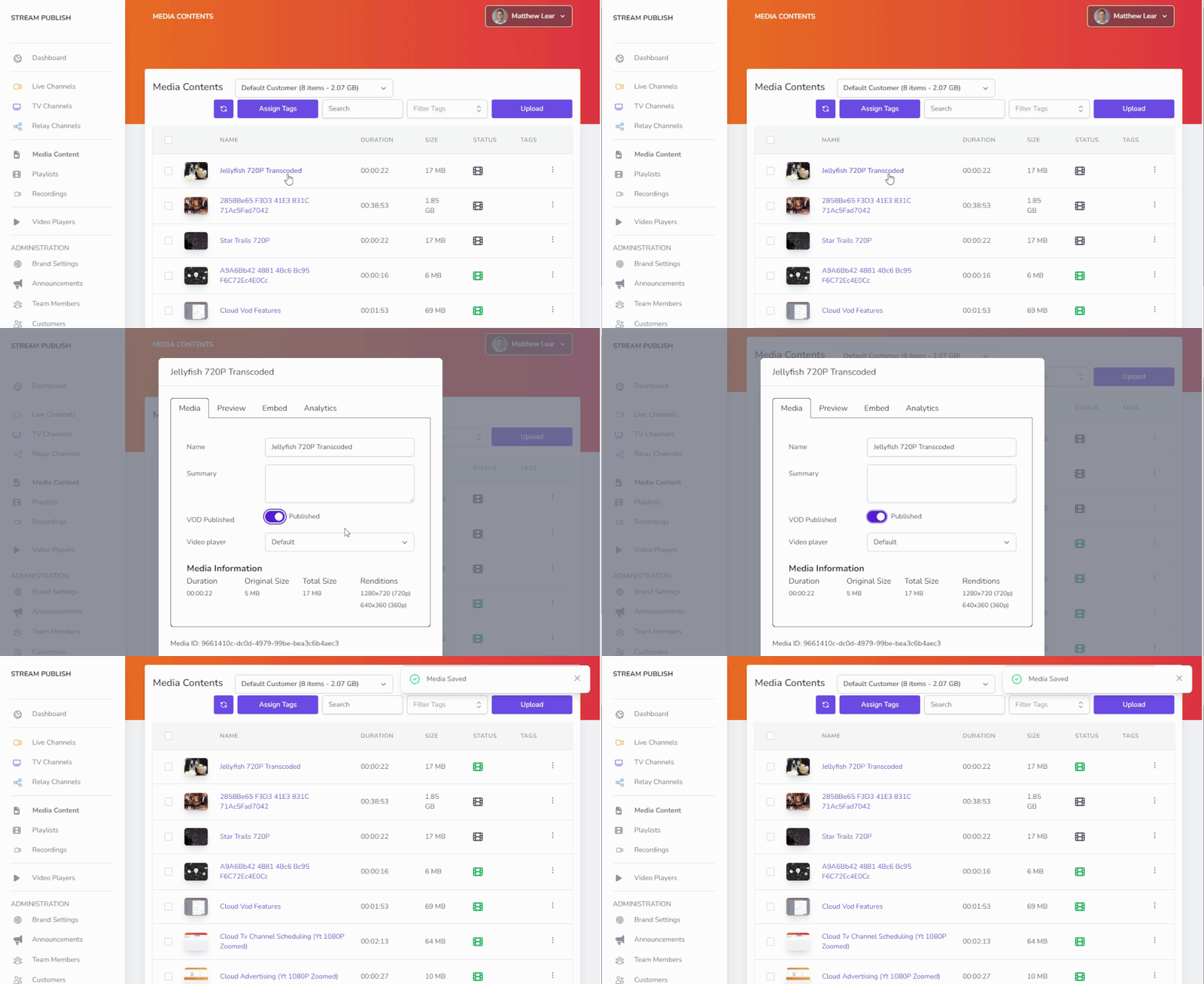
  1. Media Content will show a new film roll icon indicating VOD published
  2. New Playlists item in the side menu appears
  3. Analytics will show “VOD” usages in a separate bar

Features Overview

  • Easy to use Media Manager with drag-and-drop support to upload your library of media
  • Automatic cloud-based transcoding, packaging, and playback in adaptive formats
  • A publicly available hosted page to playback a video or playlist of videos
  • A publicly available hosted CMS to playback multiple videos
  • Video Analytics providing unique viewer numbers and bandwidth consumption
  • Global Streaming via CDN to anywhere in the world
  • Brandable and Customisable Video Player

Uploading VOD Content for Publishing

  1. Press the Upload button in the top right of the interface
  2. Drag and drop one or more files from your desktop into the field designating upload. It is important to drop files into this field and no where else on the screen.
  3. Do not close the window until all files have uploaded successfully.
  4. Once all files are uploaded, processing of the file into multiple adaptive formats will begin. 

Enable VOD Publishing on existing content

  1. Navigate to Media Contents
  2. Click on the name of an item
  3. Check the Published toggle
  4. Click “Save
  5. Processing will begin immediately

Table of Contents